

The inlichtingenfiche and socio-economic data
Linking a dossier connects it to the case. Submitting the inlichtingenfiche is what actually claims it in eLys, the formal statement of how the deceased will be buried or cremated.
Drafting
Section titled “Drafting”The inlichtingenfiche panel opens as a form on a linked dossier. It stays folded by default, since claiming a dossier is a deliberate step, not something to do in passing.
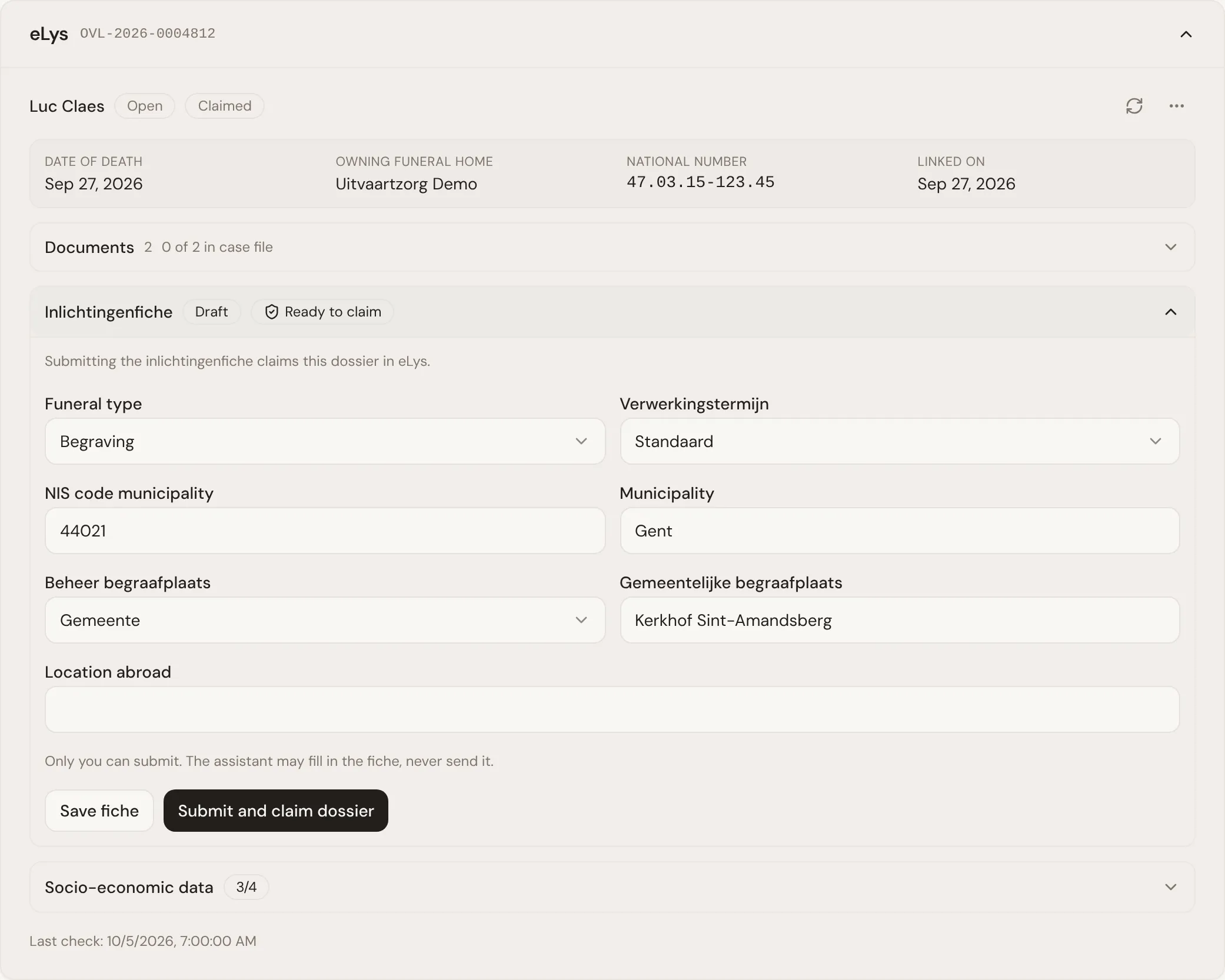
You can save the draft at any point without submitting it. Saving is cheap and reversible: it just keeps your progress on the case, and does not touch eLys.
- Route: burial or cremation, which changes the rest of the form.
- Processing term: standard, or accelerated with a note explaining why.
- Burial details: the municipality, whether the cemetery is managed by the municipality, a crematorium or is private, and its name or a foreign location.
- Cremation details: the crematorium and what happens to the ashes, including where they go and, where relevant, who the ashes are entrusted to.
The panel lists what is still missing before the dossier can be submitted, so you always know what is left rather than finding out on submission.
What the agent may prefill
Section titled “What the agent may prefill”Once a dossier is linked, Lethra fills in the burial or cremation route from the case’s funeral type, if one is set. It does this once per case and never overwrites a route that is already on the draft.
The agent can also fill in other fields from what it learns on the case: its services, meeting notes or conversations with the family. It does not guess at anything the family or your firm has not decided yet. When fields are still missing, it asks your team for exactly those, and when the draft is complete it tells you it is ready to submit.
Submitting, updating, releasing and marking handled
Section titled “Submitting, updating, releasing and marking handled”- Submit and claim dossier: submitting the draft for the first time claims the dossier. Submission is only possible once the required fields are filled in.
- Send correction: once claimed, saving further changes and sending them updates the same inlichtingenfiche in eLys.
- Release dossier: gives up the claim, so another funeral home can claim it. Use it, for example, if it was claimed by the wrong firm or case.
- Mark as handled: closes the dossier in eLys once everything is done.
The last three only appear once the inlichtingenfiche has been submitted. Releasing and marking as handled both ask you to confirm first.
The panel shows the current status of the inlichtingenfiche: draft, submitted, released or handled, so anyone opening the case can see where it stands at a glance.
Socio-economic data
Section titled “Socio-economic data”Alongside the inlichtingenfiche, eLys asks for socio-economic data about the deceased for Statbel, and optionally about the mother and the father or co-mother. This lives in a separate section on the linked dossier: education, occupational status, social status, housing situation and household situation, recorded for each person where eLys asks for it.
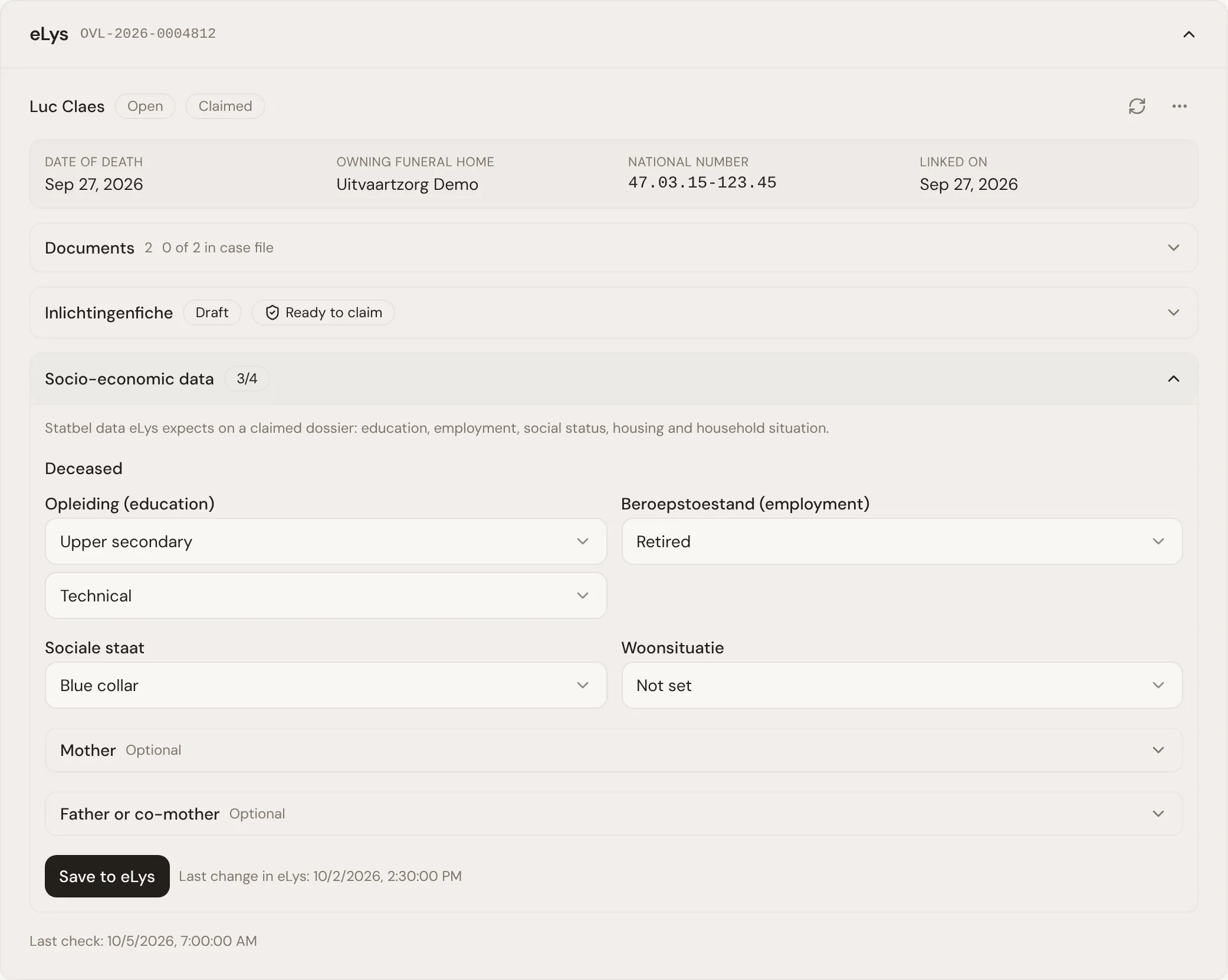
Like the inlichtingenfiche, this data is only saved to eLys when you click Save to eLys; nothing is sent as you type. The agent can read what eLys already holds and gather missing answers from the family or meeting notes, but only a person at your firm saves it. The section tracks how much of the deceased’s information is filled in, and shows when it was last saved.
Back to how the connection works: Connecting eLys.
Was this page helpful?
Thank you. We read every reply and use it to improve the guides.