

Ad budgets
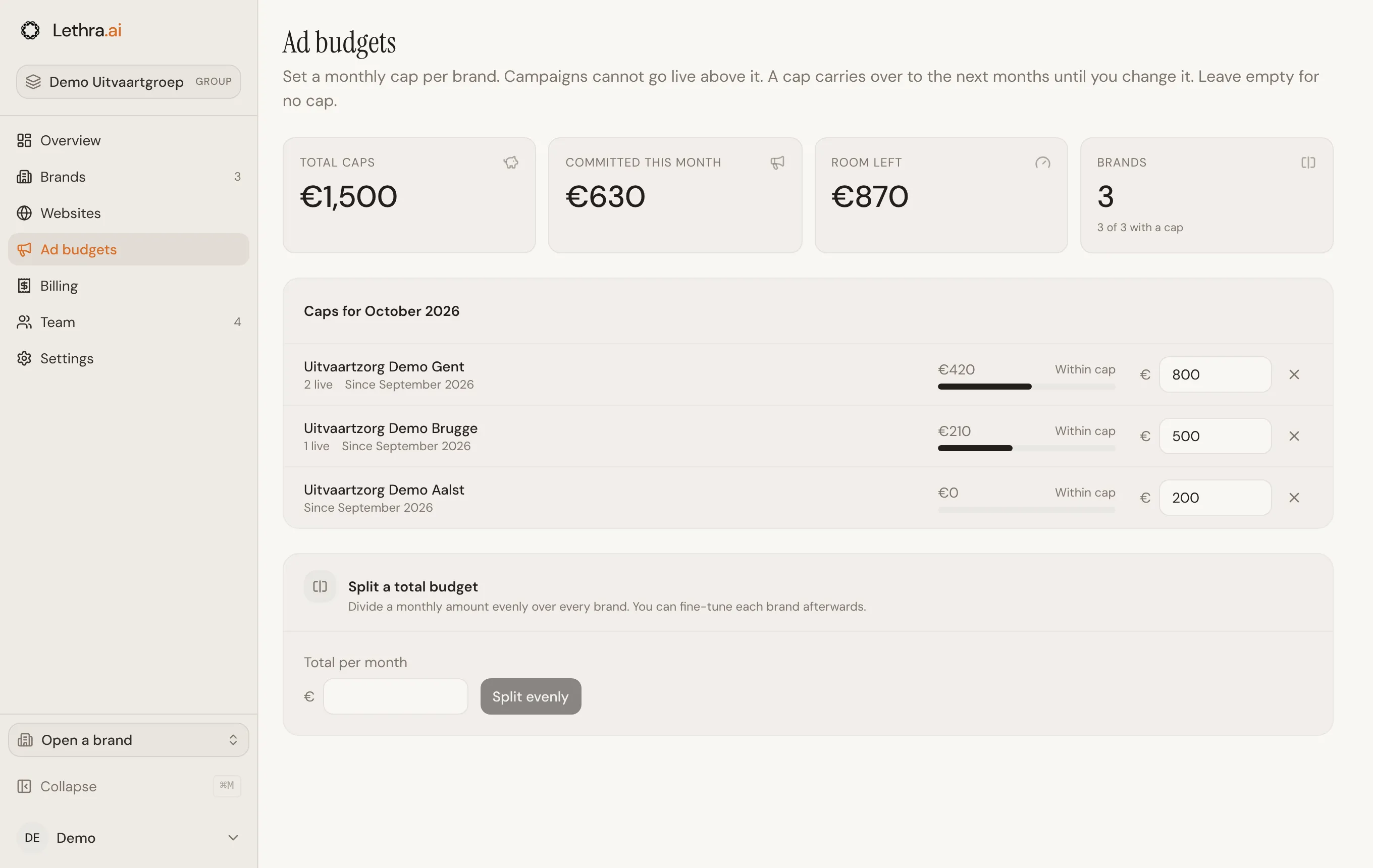
Each brand runs its own ad campaigns. On Ad budgets, head office sets how much each brand may commit per month. Lethra stops a brand from committing more than that.
What counts as committed
Section titled “What counts as committed”A campaign commits its daily budget for every day of the month. A campaign of €10 a day in a 31-day month commits €310. Campaigns that are live or in review count. Drafts, and campaigns that are approved but not live yet, paused or completed, do not.
This is what a brand has signed up to spend, not what has been spent so far.
Setting a cap
Section titled “Setting a cap”Type an amount in euros next to a brand, then press Enter or click elsewhere. The cap is saved straight away.
- A cap carries over. It applies to this month and every month after, until you change it. “Since September 2026” under a brand means the cap was set then and still applies.
- Changes start this month. Earlier months are not touched.
- No cap. Clear the field, or click the cross next to it. The brand can then commit any amount, from this month on.
What happens at the cap
Section titled “What happens at the cap”When a brand tries to put a campaign live, send it for review, or raise its daily budget, Lethra adds it to what the brand has already committed. If the total would go over the cap, the change is refused. Lowering a daily budget is always allowed.
A brand can still end up above its cap, for example when you lower a cap below what is already committed. Nothing is stopped in that case. The brand shows Above cap and appears on the overview under Needs attention.
Reading the page
Section titled “Reading the page”The four numbers at the top are the total of all caps, what is committed this month, the room left under the caps, and how many brands have a cap.
Each brand shows its committed amount, a bar against its cap, the number of live campaigns, and one of four states:
- No cap
- Within cap
- Close to cap: 85% of the cap or more
- Above cap
Split a total budget
Section titled “Split a total budget”To divide one monthly amount over every brand, enter it under Split a total budget and click Split evenly. Each brand gets the same amount in whole euros. If the amount does not divide evenly, the first brands get one euro more. Then fine-tune individual brands.
Splitting replaces the cap of every brand, including brands that had none. The form only appears when the group has two brands or more.
See what the group pays and set the billing details: Billing and settings.
Was this page helpful?
Thank you. We read every reply and use it to improve the guides.