

The group overview
The overview is the first page you see when you sign in as a group member. It answers one question: is every brand doing what it should?
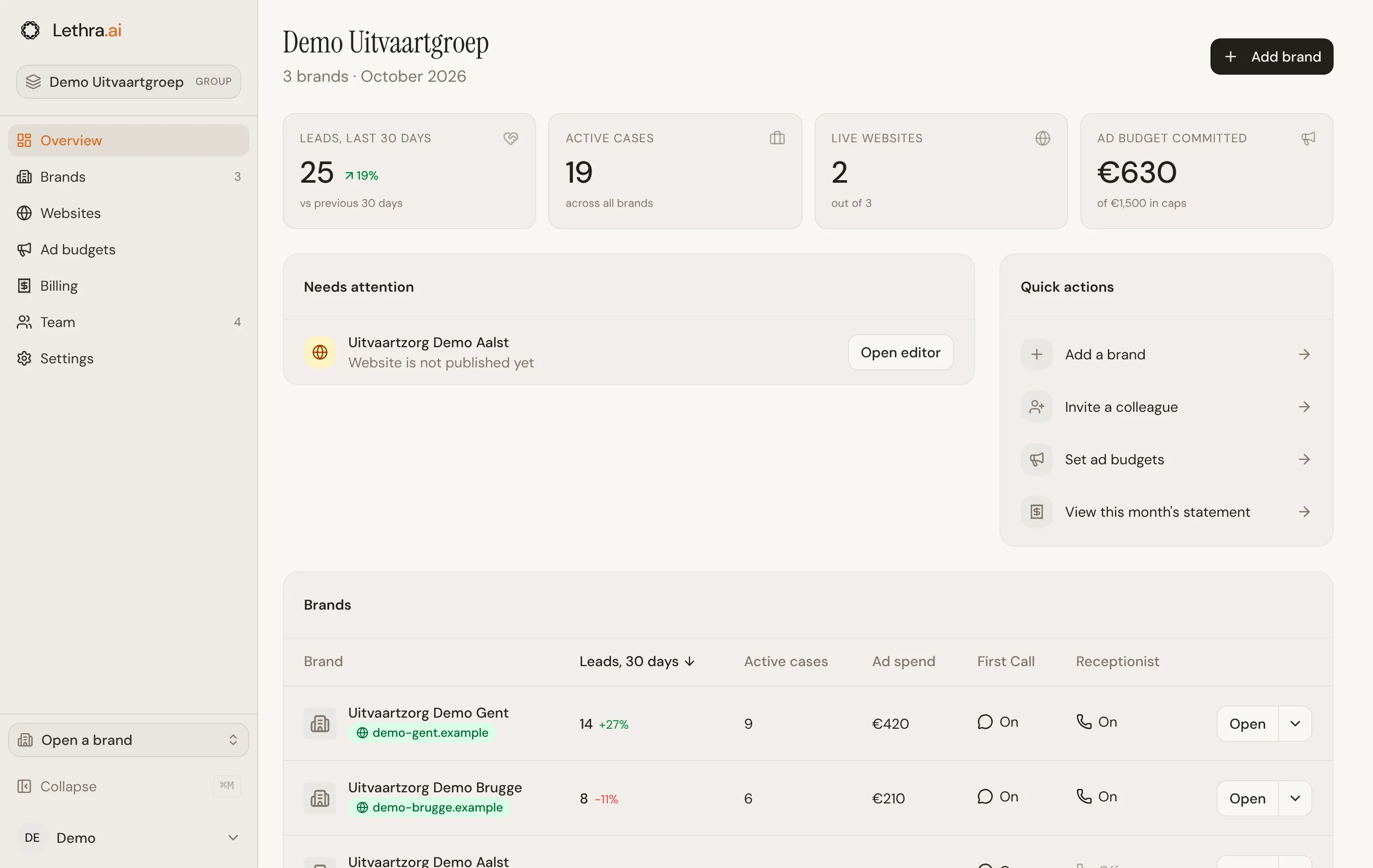
The four numbers
Section titled “The four numbers”- Leads, last 30 days: new leads across every brand, counted the same way as the Leads tab inside a brand. The percentage compares them with the 30 days before. A new group sees “No earlier data yet” until there is something to compare with.
- Active cases: open cases across every brand. Closed and archived cases are left out, using each brand’s own case statuses.
- Live websites: how many brands have a published site, out of all your brands.
- Ad budget committed: what the ad campaigns of every brand are set to spend this month, next to the total of your monthly caps. See Ad budgets.
Needs attention
Section titled “Needs attention”This list shows what to look at, most urgent first. Each line names the brand and has a button that takes you to the right place.
| What you see | The button |
|---|---|
| Ad campaigns are above the monthly cap | Review budget opens Ad budgets |
| Ad campaigns are close to the monthly cap (85% or more) | Review budget opens Ad budgets |
| No new leads in 30 days, when there were some the 30 days before | Open leads opens that brand’s leads |
| No website yet | Create website opens that brand’s website editor |
| Website is not published yet | Open editor opens that brand’s website editor |
| Custom domain is not connected yet | Connect domain opens that brand’s website editor |
| First Call is off, so families cannot reach the brand online | Turn on opens that brand’s First Call settings |
The list shows six lines at first. Use Show all to see the rest. When nothing needs you, the list says every brand looks healthy.
Quick actions
Section titled “Quick actions”Shortcuts to the things head office does most: Add a brand, Invite a colleague, Set ad budgets and View this month’s statement.
Set up your group
Section titled “Set up your group”A new group also sees a short setup list above the numbers, with four steps:
- Add your brands: done once the group has two brands or more.
- Invite your team: done once the group has two members or more.
- Complete billing details: done once the billing email and address are filled in under Settings.
- Launch a first website: done once one brand has a published site.
Each open step has a button that takes you there. The list disappears when all four are done. You can also click Hide. That is remembered on this browser only, so it may come back on another computer.
The brands table
Section titled “The brands table”At the bottom, the five brands with the most leads in the last 30 days. Click a brand to open it. With more than five brands, View all brands opens the full list. The columns are explained in Brands and websites.
Add brands and keep their websites on track: Brands and websites.
Was this page helpful?
Thank you. We read every reply and use it to improve the guides.